
Their names on the first screen
“Dear Sophie & Daniel” is written on the opening and stays through the film, before the invitation even plays.
 Jovela
Personal invitations
Paste your guest list and every guest or family gets their own link. They open an invitation that greets them by name, keeps the seats you planned for them and already knows who is replying.
Opens the invitation that “Sophie & Daniel” receive
The same beautiful invitation for everyone, made personal at every step.
“Dear Sophie & Daniel” is written on the opening and stays through the film, before the invitation even plays.
In WhatsApp, the link’s card already reads “Dear Sophie & Daniel · You are invited ✨”. They know it was sent to them.
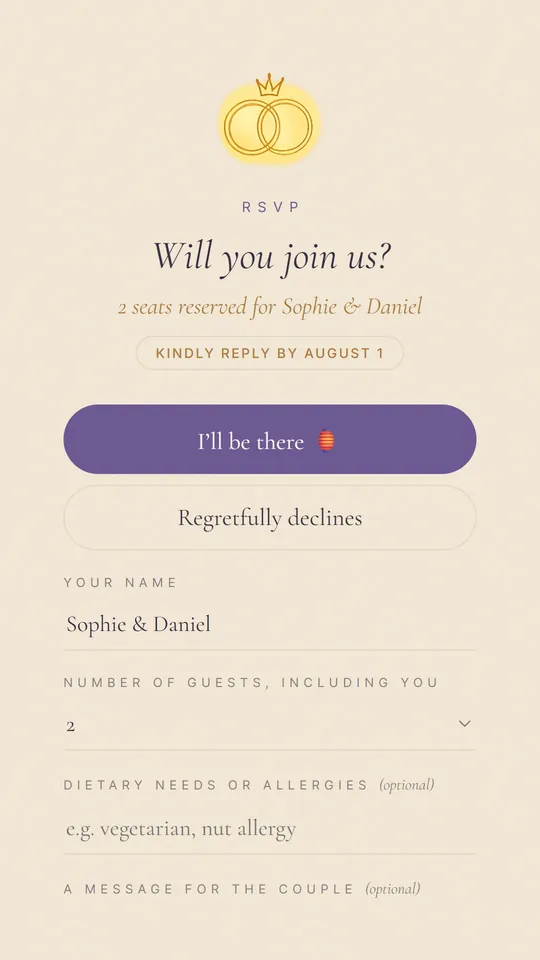
The reply form knows them: their names are filled in, and they can answer only for the seats you kept for them. No surprise plus-ones.
You were there the night we met. It wouldn’t be our day without you two. 💛
Add a few lines for one guest: they appear on their invitation only, at the top of the details.
One guest or family per line, straight from your notes, Excel or Google Sheets. Add the number of seats and a phone number if you like. Jovela reads it back to you before adding anything.
One tap per guest: WhatsApp opens with your message and their link ready. With their number, it opens straight on their chat. Or copy the link for a text, Instagram or email.
Your list shows who hasn’t opened it yet, who opened it and who replied, with the number of people coming. Remind only those who haven’t answered, in one tap.
Emma & James, 2
Aunt Rose, 1
The Smiths · 4 · +44 7700 900123
Lucas, 1
| Greeting | Guest | Seats | Their link |
|---|---|---|---|
| Dear | Emma & James | 2 | jovela.app/meera-dev/k7m2qx |
| Dear | Aunt Rose | 1 | jovela.app/meera-dev/r4t8wd |
| Dear | The Smiths | 4 | jovela.app/meera-dev/h2nc5v |
| Dear | Lucas | 1 | jovela.app/meera-dev/p9za3e |
The greeting is yours to change for each guest: “Dearest”, “To”, any word of your own, or none.
You can use both: personal links for the people you invite one by one, the general link for a group chat.
| One link for everyone | A personal link for each guest | |
|---|---|---|
| On the first screen | The invitation | “Dear Emma & James”, then the invitation |
| The card in WhatsApp | The same for everyone | Their names on it |
| Number of guests | Guests choose how many come | Only the seats you kept for them |
| The reply form | Guests type their names | Their names already filled in |
| What you see | Who replied | Who opened it, who replied, who hasn’t yet |
| Reminders | To everyone, in the group | Only to those who haven’t replied |
| Price | Included | Included, unlimited guests |
Jovela writes the message for you, with each guest’s greeting and link. Change it once and it changes for everyone, or copy one of these.
Dear Emma & James 💌
We would love to celebrate with you! Here is your invitation, made just for you (open it with the sound on 🔊):
https://jovela.app/meera-dev/k7m2qx
— Meera & Dev
Dear Aunt Rose, a gentle reminder 💛 We’d love to know if you can come: you can reply in one tap on your invitation:
https://jovela.app/meera-dev/r4t8wd
— Meera & Dev
Dear Lucas, this one has your name on it ✨ Open it with the sound on:
https://jovela.app/meera-dev/p9za3e
Weddings, birthdays, baby showers and parties: every Jovela design greets your guests by name. Open one as a guest:
No. Personal links are included in the one payment when you publish (from $19), for unlimited guests (up to 1,000 personal links per invitation). Creating and previewing your invitation is free.
Yes. Your invitation’s general link keeps working: send personal links to the people you invite one by one, and the general link in a group chat if you like.
No. They open the link in their phone’s browser and reply in one tap. No app, no account, no password.
Change it in your guest list at any time. The guest’s link stays the same, and their invitation shows the new name or seats the next time it is opened.
A personal link opens for whoever has it and always greets the same guest. Send each link only to its guest, and use the general link or add a new guest for anyone else.
“Dear” by default in English. In French and Spanish Jovela picks the right form for one person, a couple or a family (Cher, Chère, Chers, Querido, Querida, Queridos…). You can change it for any guest or leave it out.
Yes. Each link can be copied for a text, Instagram, Messenger or email, and you can copy all the links at once or download your list as a spreadsheet.
Only you. Each guest sees only their own name and the words you wrote for them; your private notes on a guest are never shown on an invitation.
All the questions about Jovela →Sending invitations on WhatsApp: etiquette →
 Dear Sophie & Daniel · You are invited ✨